
When working with embedded IoT devices, TLS configuration can often be the most opaque part of the network stack. The STM32 B-L475E-IOT01A2 discovery kit, equipped with an Inventek ISM43362 Wi-Fi module, provides built-in TLS support through AT commands. However, it offers limited visibility into what cryptographic features it actually supports, making debugging difficult.
This post documents an analysis of the board’s TLS 1.2 handshake behavior when connecting to Spotflow MQTT server. By capturing and inspecting the handshake packets, we identified the supported cipher suites, signature algorithms, and key constraints of the module’s TLS implementation. The goal is to provide a reference for other developers integrating TLS on similar constrained hardware, and to explain why certain TLS handshake failures (like “no shared cipher” or “no suitable signature algorithm”) may occur.
Setup Overview
The board uses an Inventek ISM43362-M3G-L44 Wi-Fi module interfaced over SPI and controlled with AT commands. We brought it up in Zephyr OS with only minor hiccups (some issues were fixed via a Zephyr RTOS patch), so basic connectivity was working. The real challenge came when we enabled TLS for connecting to our MQTT server: the TLS handshake was failing with an SSL routines::no shared cipher error. In other words, the client (our IoT board) and server could not agree on any common cipher suite to use.
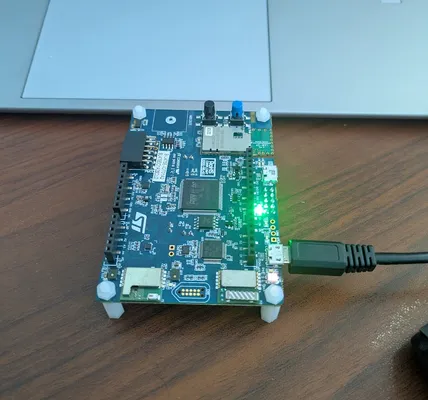 STM32 B-L475E-IOT01A2 Discovery Kit with Inventek ISM43362 Wi-Fi Module
Capturing the TLS Handshake
With no clear documentation on which TLS cipher suites the module supports, we had to inspect the live TLS handshake. We mirrored the board’s network traffic through a MikroTik router and used its built-in packet sniffer to capture the TLS exchange, then loaded the capture into Wireshark for analysis. This approach lets us see exactly what the board was sending and receiving during the handshake.
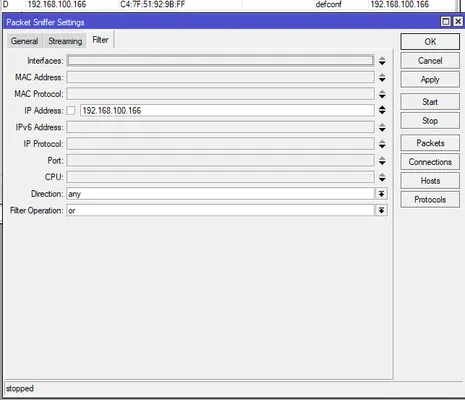 Capturing the TLS handshake via a MikroTik router’s packet sniffer. The router mirrored the board’s traffic and allowed us to record the TLS handshake packets for analysis.
Analyzing Client Hello
Examining the Wireshark capture of the TLS Client Hello (the first message the board sends in a TLS handshake) revealed that the board supports only a limited set of TLS 1.2 cipher suites. Most of the advertised suites were legacy options (e.g. older RSA-based key exchange or CBC-mode ciphers that modern servers often disable), but importantly it did offer at least one elliptic-curve cipher: TLS_ECDHE_ECDSA_WITH_AES128_SHA256. This is an ECDSA-authenticated cipher suite using ephemeral ECDH and AES-128-CBC with SHA-256. Notably, no modern TLS 1.2 ECDHE-ECDSA GCM suites were present, only this CBC mode option.
Our MQTT broker by default did not allow this particular cipher suite, as it preferred other, more modern ciphers. This explained the initial “no shared cipher” failure. To fix the issue, we adjusted our broker’s TLS configuration to allow the ECDHE-ECDSA-AES128-SHA256 suite and deployed an appropriate ECDSA certificate on the server alongside the existing RSA certificate so that this cipher could be negotiated. After updating the broker’s settings to enable that suite, the TLS handshake progressed further, and the client and server finally agreed on a cipher and moved on to the next steps of the handshake.
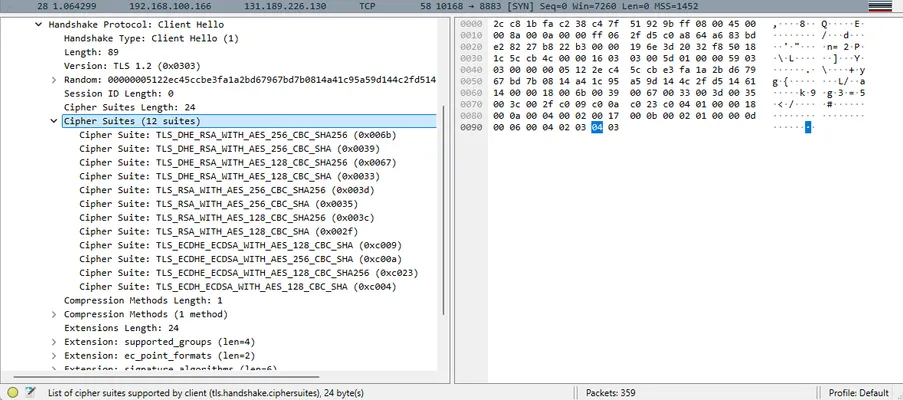 Wireshark view of the Client Hello, listing the cipher suites offered by the IoT board. The board’s supported list was very limited. Here we see it includes some legacy RSA-based ciphers and the crucial ECC cipher suite ECDHE-ECDSA-AES128-SHA256 that we enabled on the server to find a common cipher.
Enabling a common cipher suite got us past the initial hurdle, but the handshake still did not complete, and the next failure manifested during certificate exchange.
Unsupported Elliptic Curve
After enabling a shared cipher, the handshake failed at the server certificate verification step with a new error: SSL routines::no suitable signature algorithm. This pointed to a certificate compatibility issue rather than a cipher issue.
In the Client Hello’s signature algorithms extension, the device listed only two options: ecdsa_sha1 and ecdsa_secp256r1_sha256. In other words, the client indicated it can only handle certificates signed using ECDSA (elliptic curve signatures), using either SHA-1 or SHA-256 as the hash. On the side, this also means that the RSA-based cipher suites listed earlier in the Client Hello are effectively unusable - the signature_algorithms extension did not list any RSA-based signature algorithms.
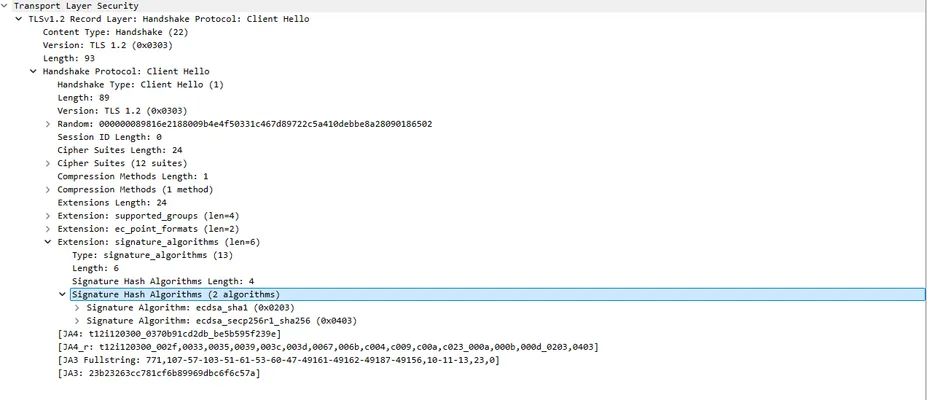 Client Hello indicating the only supported signature algorithms on the device: ecdsa_sha1 and ecdsa_secp256r1_sha256. The board’s TLS stack did not advertise support for any RSA signature algorithms, explaining why an RSA-signed certificate would be rejected.
Given that we introduced support for ECDSA certificates in the previous steps, we thought this wouldn’t be an issue. However, the TLS handshake still hung during certificate verification on the device. Despite using an ECDSA certificate, the board refused to finalize the connection. Digging deeper with Wireshark, we found the culprit: the Let’s Encrypt ECDSA certificate chain includes an intermediate certificate signed with ECDSA P-384/SHA-384 (i.e. using the secp384r1 elliptic curve and a SHA-384 hash for the signature). The device’s TLS implementation doesn’t support that hash, causing the certificate chain validation to fail on the board.
In more concrete terms, the ECDSA certificate chain from Let’s Encrypt looked like this: an ECDSA P-256 leaf certificate (issued to our domain), signed by an ECDSA intermediate certificate. That intermediate was using a P-384 key and was itself signed with an ECDSA-SHA384 signature. This is a modern and secure chain, but our IoT client did not understand the SHA-384 hash algorithm. As a result, the board could not verify the intermediate CA’s signature, and the handshake stalled waiting for a valid certificate chain (which it would never accept in this form).
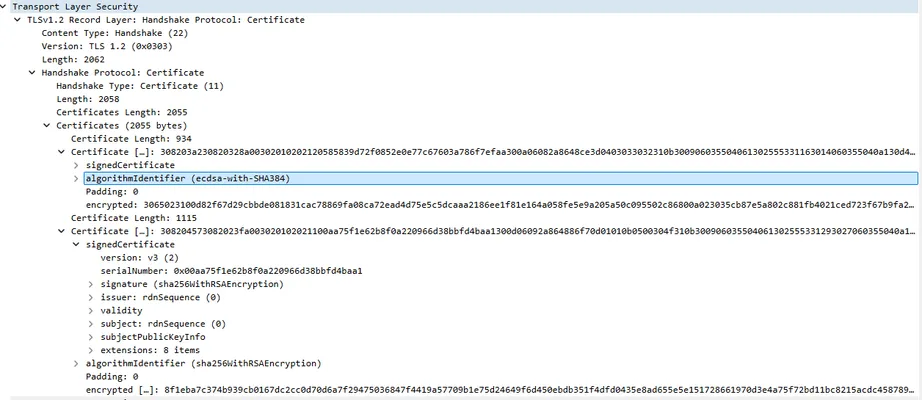 Wireshark showing an intermediate certificate in the chain signed with an unsupported algorithm (ecdsa-with-SHA384 on a P-384 curve). The IoT board’s TLS stack cannot handle the SHA-384 hash, so it fails to validate the chain.
Conclusion
TLS integration on constrained IoT hardware often depends on non-obvious implementation limits. The STM32 B-L475E-IOT01A2 and its Inventek Wi-Fi module demonstrate how mismatches in supported cipher suites or certificate signature algorithms can silently block secure connections. In summary, the board only supported a narrow set of older TLS 1.2 ciphers and only ECDSA-based certificates, which required careful alignment with the server’s configuration. Even after configuring the server to use an ECDSA certificate, the presence of an unsupported ECDSA P-384/SHA-384 intermediate CA in the chain caused the handshake to fail. These kinds of issues can be frustrating to debug, but knowing the device’s exact TLS capabilities is key to finding a solution.
If you are Spotflow user and have this board or any board with similar TLS issues, let us know. We will adjust our TLS configuration so that your board is able to connect.