
Key Takeaways
- MQTT 5 User Properties let you attach arbitrary key/value metadata to MQTT messages.
- By using User Properties to add context to messages (e.g.,
origin,firmware_version), you can improve IoT observability without changing payloads or topics. - You can use MQTT 5 User Properties with popular MQTT client tools, such as Mosquitto CLI.
MQTT 5 introduced several features to enhance the flexibility of MQTT messaging. One of the most useful for developers is User Properties, which allow you to attach custom metadata to messages. In this post, we’ll explain what MQTT 5 User Properties are and how you can leverage them for improving IoT observability. We’ll also show practical examples using the Mosquitto command-line tools to illustrate how to set and use User Properties.
What are MQTT User Properties?
In MQTT 5, User Properties are essentially user-defined metadata that can be included with MQTT messages. Unlike MQTT 3.x, which had no built-in way to add arbitrary headers or metadata, MQTT 5 User Properties provide a flexible mechanism to transmit additional information along with a message. In effect, they function much like HTTP headers, allowing you to include custom data without altering the message payload.
Some key characteristics of MQTT 5 User Properties include:
- Custom UTF-8 string key/value pairs: You can define any number of metadata fields (keys and values are UTF-8 strings) to send alongside a message. For example, you might add a property
source=sensor_Aorformat=jsonto a message. - Available on most packets: User Properties can be added to PUBLISH messages and many other packet types (CONNECT, PUBLISH, etc.), so they work across the MQTT flow (only ping packets are excluded).
- No fixed limit: There is no fixed limit to the number of User Properties you can attach. The only constraint is the maximum message size allowed by the broker.
- Non-intrusive metadata: Because they are part of the MQTT 5 protocol, User Properties don’t clutter the payload. Subscribers receive them as separate metadata fields, analogous to protocol headers in other systems.
How MQTT 5 User Properties Improve IoT Observability?
User Properties are a practical building block for improving IoT observability by adding meaningful context to MQTT messages as they move through an IoT environment. In systems with many devices, services, and brokers, understanding where data comes from and how it is processed is essential for monitoring, troubleshooting, and performance analysis. By attaching descriptive information as User Properties, publishers can provide visibility into message origin and purpose without changing the payload. Common examples include a trace ID, device ID or the origin region/client ID/factory ID.
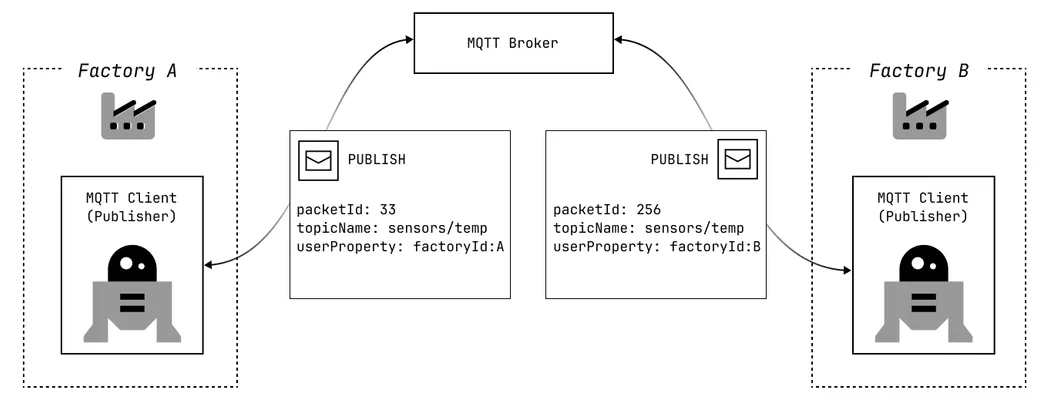 Adding the publisher’s factory ID as a User Property improves IoT Observability.
As useful as User Properties are, their value becomes most apparent when compared to how telemetry is commonly handled today. Many IoT deployments still rely on payloads alone to carry not just measurement data, but also the contextual information needed to interpret it. This approach often emerges organically in early system designs, when the number of devices is small and troubleshooting is straightforward. However, as fleets scale and more systems consume the same data streams, the limitations of payload-only telemetry quickly surface.
The Problem with Payload-Only Telemetry
To illustrate the limitations of payload-only telemetry, consider a practical example. You operate a fleet of 10,000 smart refrigerators deployed across multiple stores. Each device publishes temperature telemetry every 30 seconds. A typical message from one of these refrigeration units might look like the following:
{
  "temperature": 7.8,
  "humidity": 41.2
}
When anomalies appear, this payload alone cannot explain:
- Which firmware produced the data
- Whether the device recently rebooted
- Which sensor module was used
- Whether the message came from production or a canary rollout
Teams often respond by embedding operational metadata directly into the payload. This approach increases system coupling, complicates payload schemas, and slows down incident response and troubleshooting. The following example illustrates how payloads are commonly extended to include metadata:
{
  "temperature": 7.8,
  "humidity": 41.2,
  "metadata": {
    "firmware_version": "3.2.7",
    "hardware_rev": "B2",
    "boot_id": "boot-18391",
    "uptime_seconds": "942",
    "env": "production",
    "sensor_module": "temp-v4",
    "factory_id": "1206",
    "trace_id": "a9f2c1e4"
  }
}
The MQTT 5 User Properties Solution
A refrigeration unit publishes telemetry with clean, domain-specific data in the payload:
{
  "temperature": 7.8,
  "humidity": 41.2
}
At the same time, it attaches additional context using MQTT 5 User Properties, for example:
firmware_version = "3.2.7"
hardware_rev     = "B2"
boot_id          = "boot-18391"
uptime_seconds   = "942"
env              = "production"
sensor_module    = "temp-v4"
factory_id       = "1206"
trace_id         = "a9f2c1e4"
This metadata is completely transparent to payload consumers, yet it significantly improves visibility into how the system behaves and how data flows through the whole system.
Beyond improving diagnostics for individual devices, User Properties also enable end-to-end traceability across complex IoT systems.
Transparent Traceability in Complex IoT Systems
In complex IoT systems, multiple factories, regions, and services often publish identical message formats to the same topics. Without explicit publisher context, tracing the origin and path of a message across the system becomes difficult.
Attaching identifying User Properties such as publisher_id / device_id or region / factory_id enables clear visibility into where messages originate and how they propagate through complex IoT systems. This metadata travels with the message and can be stored alongside the actual payload in downstream systems, such as databases, data lakes, or metrics backends. Because User Properties are independent of the message format, infrastructure components can process them without inspecting or parsing the payload itself.
This additional context becomes important when diagnosing issues. For example, a monitoring system detects an increase in defect counts. All factories use the same equipment and publish the same payload structure, so looking at the payload alone does not reveal whether the issue is systemic or isolated.
When User Properties are stored alongside the data, engineers can easily analyze metrics by factory. This quickly shows that only one factory is affected, while all others operate normally.
If this information had been embedded in the payload instead, every consumer would need to understand the payload format and schema and extract the fields manually.
Working with MQTT 5 User Properties Using Mosquitto CLI
To illustrate how MQTT 5 User Properties work, we’ll use the Mosquitto MQTT CLI tools (mosquitto_pub + mosquitto_sub). These examples assume you already have an MQTT broker running locally or accessible remotely. If not, you can quickly start one using the Mosquitto MQTT broker.
Make sure you’re using Mosquitto version 1.6 or later (preferably 2.x) as earlier versions do not support MQTT 5 features. Use the --protocol-version mqttv5 flag to ensure the CLI operates in MQTT 5 mode, and the --property flag to attach User Properties.
Terminal 1 – Start a subscriber
Open a terminal window and subscribe to a topic:
mosquitto_sub --protocol-version mqttv5 --topic sensors/temp -F %jThis will listen for messages on the sensors/temp topic using MQTT version 5. The -F %j option formats each received message as structured JSON, including metadata and MQTT 5 properties.
Terminal 2 – Publish a message with User Properties
In a second terminal, publish a message with custom metadata using User Properties:
mosquitto_pub --protocol-version mqttv5 --topic sensors/temp --message "-10" \
    --property publish user-property trace_id 12345 \
    --property publish user-property factory_id A
Here, we’re sending a payload of -10 (e.g., temperature reading), and attaching two User Properties: trace_id=12345 and factory_id=A. The --property publish user-property <name> <value> syntax instructs the Mosquitto client to include these key/value pairs in the MQTT PUBLISH packet.
Observing the User Properties
Back in Terminal 1, the subscriber receives the message. Along with the payload value ("-10"), the message also includes the associated User Properties.
The JSON-formatted output below illustrates the received message together with its metadata:
{
  "tst": "2026-02-02T15:34:30.469000+0100",
  "topic": "sensors/temp",
  "qos": 0,
  "retain": 0,
  "payloadlen": 3,
  "properties": {
    "user-properties": {
      "trace_id": "12345",
      "factory_id": "A"
    }
  },
  "payload": "-10"
}
This output confirms that the properties were successfully transmitted. Any MQTT 5 compliant client library would likewise be able to read these User Properties from the received message.
Conclusion
By attaching User Properties to MQTT messages, you can significantly improve the observability of an IoT system. These properties significantly simplify debugging and monitoring by allowing contextual information to travel with each message without modifying payloads or topics.
MQTT 5 User Properties bring HTTP-like header capabilities to MQTT, enabling advanced patterns such as end-to-end observability and message correlation in a simple and interoperable way.