
You shipped a fleet of temperature monitoring nodes across multiple plants and regions two months ago. Readings look stable. Then QA surfaces a bug: the firmware shipped without the calibration correction. Every sensor is off by 1.5 °C. The fix is a one-line change, but rolling a truck or sending engineers to every site is slow and expensive.
This post shows you how to push that fix remotely, from code change to confirmed update, using Spotflow OTA updates on an NXP FRDM-RW612 running Zephyr RTOS. The zephyr-firmware-ota example on GitHub provides a complete working reference.
Key Takeaways
- Minimal application code. Call
spotflow_confirm_main_firmware_image()on boot and implement one progress callback. The SDK handles the rest: download, MCUboot swap, reboot, and reporting to the cloud. - Automatic rollback. MCUboot starts the new image in test mode. If your code never calls
confirm, the next reboot rolls back to the previous firmware automatically. - Deployment control in the portal. Create cohorts, target specific devices by tag, monitor per-device status, and stop or retry deployments at any time.
How Spotflow OTA updates work
Spotflow OTA updates use MCUboot’s A/B image slots. The flow from triggering a deployment to a confirmed update is:
- The Spotflow cloud notifies the device about the update over MQTT.
- The SDK downloads the signed firmware image over HTTPS into the MCUboot secondary slot (
slot1_partition). - The SDK requests a MCUboot test upgrade and reboots.
- MCUboot swaps the images. The new image then runs in test mode (unconfirmed).
- Your application validates the new firmware and calls
spotflow_confirm_main_firmware_image(). - The SDK confirms the image with MCUboot and reports success to the Spotflow cloud.
If the device crashes before step 5 (or if you call sys_reboot() instead of confirming), MCUboot detects the unconfirmed state on the next boot and swaps back to the previous image. The SDK then reports the update as failed.
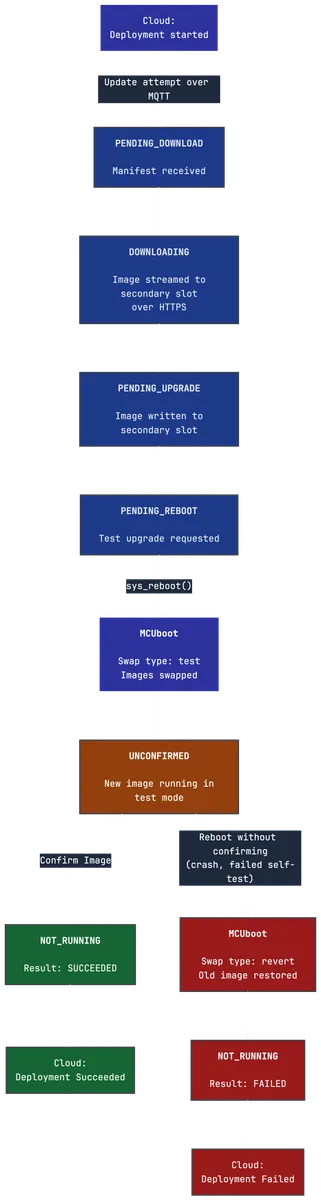
The main firmware update phases are:
| Phase | What is happening |
|---|---|
NOT_RUNNING |
No update in progress — the idle state on a normal boot and after an update completes |
PENDING_DOWNLOAD |
Update notification received, download ready to start |
DOWNLOADING |
Image is being streamed into the secondary slot |
PENDING_UPGRADE |
Download complete, MCUboot test upgrade about to be requested |
PENDING_REBOOT |
Test upgrade requested, device is rebooting |
UNCONFIRMED |
Device booted the new image; waiting for application confirmation |
The example application
The zephyr-firmware-ota example simulates a temperature monitoring node. It reports sensor readings every 2 seconds and is always ready to receive an OTA update.
The scenario:
- v1.0.0 ships with
TEMP_CALIBRATION_OFFSET = 0.0f, no correction applied. - v2.0.0 fixes it with
TEMP_CALIBRATION_OFFSET = 1.5f.
The entire v1 → v2 change is two lines in src/main.c. Everything else (the download, the swap, the reboot, and the portal status update) is handled by the SDK.
Prerequisites
- NXP FRDM-RW612
- A Spotflow account and ingest key: sign up for free
- Python 3.12+ and Git
- Zephyr host dependencies: see the Getting Started Guide
Setting up the project
west.yml
The manifest pins Zephyr v4.4.0 and includes the modules needed for NXP Wi-Fi and MCUboot:
manifest:
  projects:
    - name: zephyr
      url: https://github.com/zephyrproject-rtos/zephyr
      revision: v4.4.0
      clone-depth: 1
      import:
        path-prefix: external
        name-allowlist:
          - cmsis_6
          - hal_nxp
          - mbedtls
          - mcuboot
          - zcbor
          - mldsa-native
          - tf-psa-crypto

    - name: spotflow-device-sdk
      url: https://github.com/spotflow-io/device-sdk
      revision: main
      path: external/modules/lib/spotflow
sysbuild.conf
OTA requires MCUboot. A single line in sysbuild.conf enables it through Zephyr’s sysbuild mechanism:
SB_CONFIG_BOOTLOADER_MCUBOOT=yThis tells sysbuild to build MCUboot alongside your application. The build system signs the application image automatically, and west flash flashes both MCUboot and the signed app in one step.
prj.conf
# Spotflow SDK
CONFIG_SPOTFLOW=y
CONFIG_SPOTFLOW_MODULE_DEFAULT_LOG_LEVEL=4

# OTA updates
CONFIG_SPOTFLOW_OTA=y
CONFIG_SPOTFLOW_OTA_AUTO_HANDLE_MAIN_FIRMWARE=y

# Flash access + persistent storage — the automatic OTA update handling
# streams the image to flash, and the update state must survive a reboot
CONFIG_FLASH=y
CONFIG_FLASH_MAP=y
CONFIG_STREAM_FLASH=y
CONFIG_NVS=y
CONFIG_SETTINGS=y
CONFIG_SETTINGS_NVS=y

# Logging, metrics, networking ...
CONFIG_SPOTFLOW_OTA_AUTO_HANDLE_MAIN_FIRMWARE=y is the key option. It tells the SDK to handle the entire download-and-upgrade sequence automatically: stream the image to the secondary slot, request the MCUboot test upgrade, and reboot. Your code only needs to confirm the image after the reboot.
CONFIG_FLASH, CONFIG_FLASH_MAP, and CONFIG_STREAM_FLASH let the SDK stream the downloaded image into the secondary slot. CONFIG_NVS=y and CONFIG_SETTINGS_NVS=y are required so the SDK can persist the update-attempt state across reboots; without them, the SDK cannot detect the unconfirmed state after a reboot and report results back to the portal.
boards/frdm_rw612.conf
# Fix buffer size for RW612 on Zephyr 4.1.0+
CONFIG_NET_BUF_DATA_SIZE=256
CONFIG_NXP_WIFI_SOFTAP_SUPPORT=n
No board overlay is needed. The FRDM-RW612’s default devicetree already defines the two MCUboot image slots:
boot_partition    0x00000000  128 KiB  (MCUboot)
slot0_partition   0x00020000    3 MiB  (running image)
slot1_partition   0x00320000    3 MiB  (OTA download target)
storage_partition 0x00620000  ~56 MiB  (NVS / settings)
Application code
The entire OTA integration in src/main.c is just a few small functions.
Confirming on boot
static void confirm_unconfirmed_main_firmware(void)
{
    struct spotflow_ota_main_firmware_state state;
    int ret = spotflow_get_main_firmware_update_state(&state);

    if (ret < 0) {
        LOG_ERR("Failed to query OTA state: %d", ret);
        return;
    }

    if (state.phase != SPOTFLOW_OTA_PHASE_UNCONFIRMED) {
        LOG_INF("OTA phase: %s", ota_phase_name(state.phase));
        return;
    }

    LOG_INF("New firmware booted (phase=%s) — confirming image",
            ota_phase_name(state.phase));

    /*
     * Insert application-specific self-tests here.
     * If any test fails, call sys_reboot() instead of confirming.
     * MCUboot will revert to the previous firmware on the next boot.
     */

    ret = spotflow_confirm_main_firmware_image(&state);
    if (ret < 0) {
        LOG_ERR("Failed to confirm firmware image: %d", ret);
        return;
    }

    LOG_INF("Firmware v%s confirmed — result will be reported to Spotflow", APP_VERSION);
}
This function is called at the top of main(), before network initialization. On a normal boot the phase is NOT_RUNNING and the function returns immediately. On the first boot after an OTA update the phase is UNCONFIRMED, and the function confirms the image and reports success to the cloud.
The comment in the middle is the place where production code would run self-tests. If they fail, calling sys_reboot() without confirming triggers a MCUboot rollback.
Progress observation
void spotflow_on_main_firmware_update_progressed(
    const struct spotflow_ota_main_firmware_state *state)
{
    if (state == NULL) {
        return;
    }

    LOG_INF("OTA progress: phase=%s paused=%d result=%d",
            ota_phase_name(state->phase), state->is_paused, state->result);
}
The SDK calls this on the OTA worker thread whenever the automatic update moves to a new phase. In this example it only logs the transition. In production you can use it to update a status LED, delay the reboot until the device is idle, or pause the download when signal is weak.
The main loop
int main(void)
{
    LOG_INF("Temperature sensor node v%s starting", APP_VERSION);

    confirm_unconfirmed_main_firmware();

    int ret = spotflow_register_metric_float(
        "temperature_celsius", SPOTFLOW_AGG_INTERVAL_1MIN, &g_temperature_metric);

    k_sleep(K_SECONDS(1));
    spotflow_sample_net_init();

    LOG_INF("Sensor loop running — ready to receive OTA updates");

    while (true) {
        float temp = read_temperature();
        LOG_INF("Temperature: %.1f C", (double)temp);
        (void)spotflow_report_metric_float(g_temperature_metric, temp);
        k_sleep(K_SECONDS(2));
    }
}
confirm_unconfirmed_main_firmware() runs before network initialization because the OTA update state is loaded from flash (NVS settings) at boot and does not require a network connection to check.
Build and flash v1
# Create workspace environment
python -m venv .venv
# Linux / macOS:
source .venv/bin/activate
# Windows (PowerShell):
# .venv\Scripts\Activate.ps1
pip install west
west update --fetch-opt=--depth=1 --narrow
west packages pip --install

# Install toolchain and NXP binary blobs
west sdk install --version 1.0.1 --toolchains arm-zephyr-eabi
west blobs fetch hal_nxp --auto-accept

# Build and flash
west build --sysbuild --pristine --board frdm_rw612 --build-dir build-v1
west flash --build-dir build-v1
The build command uses --sysbuild so MCUboot is included. west flash flashes both MCUboot and the signed application image.
On boot, the serial output shows v1.0.0 starting and the OTA update state as NOT_RUNNING, with no pending update:
*** Booting MCUboot ee39e2d694bd ***
*** Using Zephyr OS build v4.4.0 ***
I: Starting bootloader
I: Primary image: magic=good, swap_type=0x2, copy_done=0x1, image_ok=0x1
I: Secondary image: magic=unset, swap_type=0x1, copy_done=0x3, image_ok=0x3
I: Jumping to the first image slot
*** Booting Zephyr OS build v4.4.0 ***
[00:00:04] <inf> main: main: Temperature sensor node v1.0.0 starting
[00:00:04] <inf> main: confirm_unconfirmed_main_firmware: OTA phase: NOT_RUNNING
[00:00:05] <inf> spotflow_sample_net: spotflow_sample_net_init: Initializing Wi-Fi...
[00:00:06] <inf> main: main: Sensor loop running — ready to receive OTA updates
[00:00:06] <inf> main: main: Temperature: 30.5 C
[00:00:08] <inf> main: main: Temperature: 31.6 C
...
[00:00:10] <inf> spotflow_sample_wifi: wifi_event_handler: Connected to SW-BASIC
[00:00:15] <inf> spotflow_net: spotflow_mqtt_establish_mqtt: MQTT connected!
Preparing firmware v2
Open src/main.c and update the two constants:
#define APP_VERSION             "2.0.0"
#define TEMP_CALIBRATION_OFFSET 1.5f /* calibration fix: systematic offset corrected */
Rebuild into a separate output directory:
west build --sysbuild --pristine --board frdm_rw612 -d build-v2The OTA image is the signed application binary:
build-v2/zephyr-firmware-ota/zephyr/zephyr.signed.binThis is the file you upload to Spotflow. MCUboot uses the image signature to verify the download before the swap.
Use a custom signing key in production. By default, MCUboot signs images with a development key that ships publicly in the Zephyr tree, so anyone could build a forged image the bootloader would accept. Before you ship to production, generate your own key and point CONFIG_BOOT_SIGNATURE_KEY_FILE at it. See the MCUboot Zephyr guide for the details.
Deploying the update
Upload the firmware image
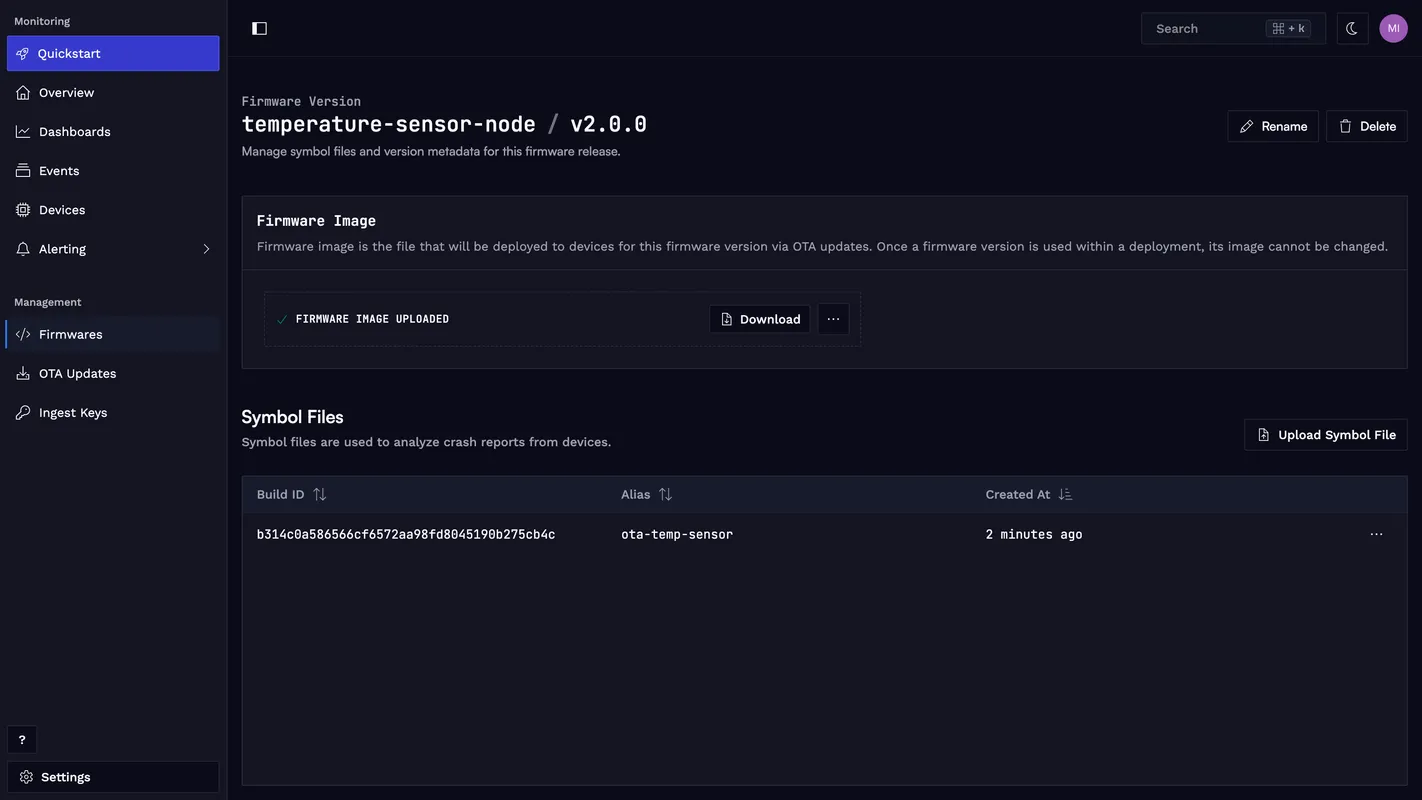
Go to app.spotflow.io/firmwares. Create a new firmware (e.g. temperature-sensor-node) and add a version 2.0.0. Upload zephyr.signed.bin as the firmware image file.
Create a deployment cohort
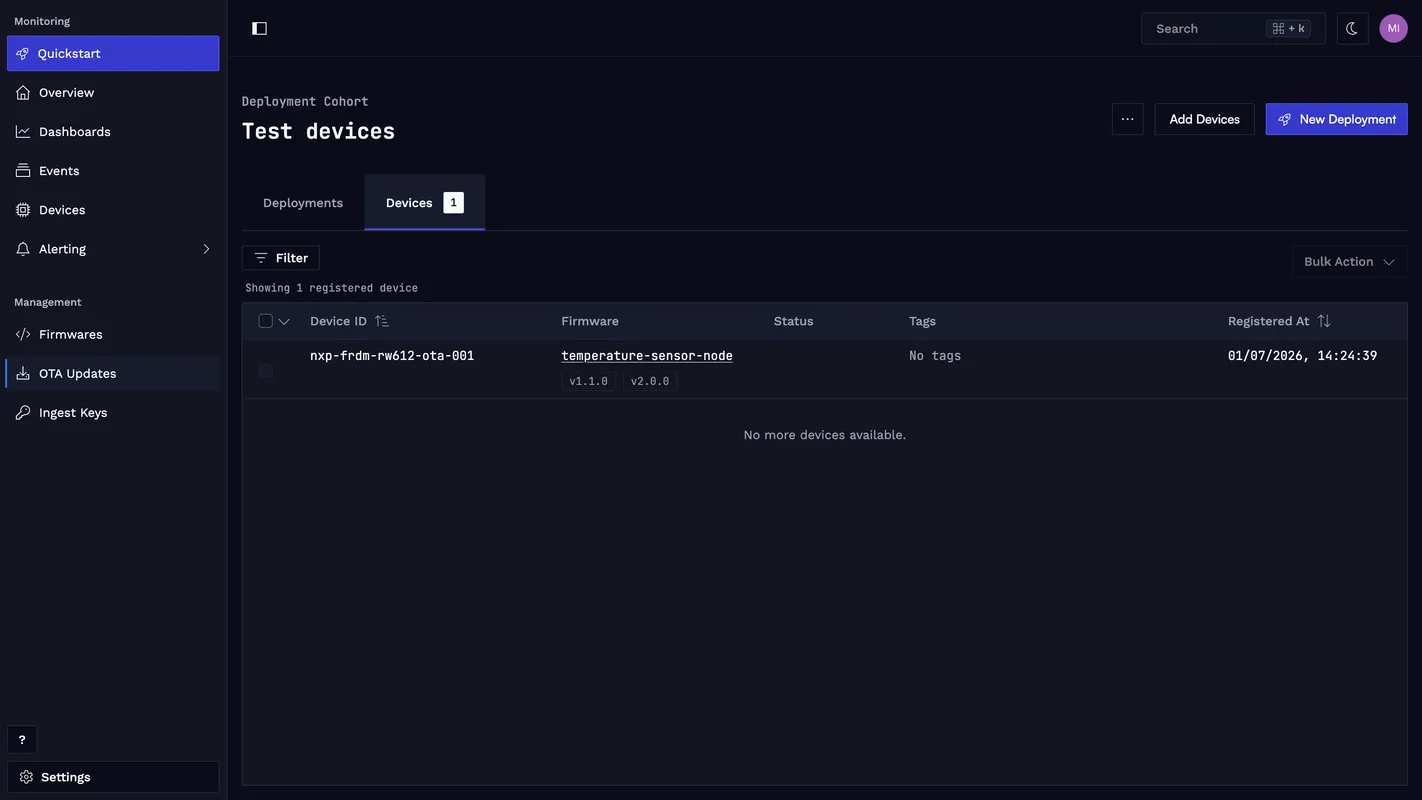
Go to app.spotflow.io/ota-updates. Click + Create Cohort, name it (e.g. Test devices), and add your device. Cohorts can be populated manually or by device tag, which makes them practical for targeting specific hardware revisions or locations in a real fleet.
Start the deployment
Click New Deployment inside the cohort. Select the temperature-sensor-node firmware and version 2.0.0. Mark it as Main in the deployment wizard; this tells the SDK to handle the update automatically. Click Start Deployment.
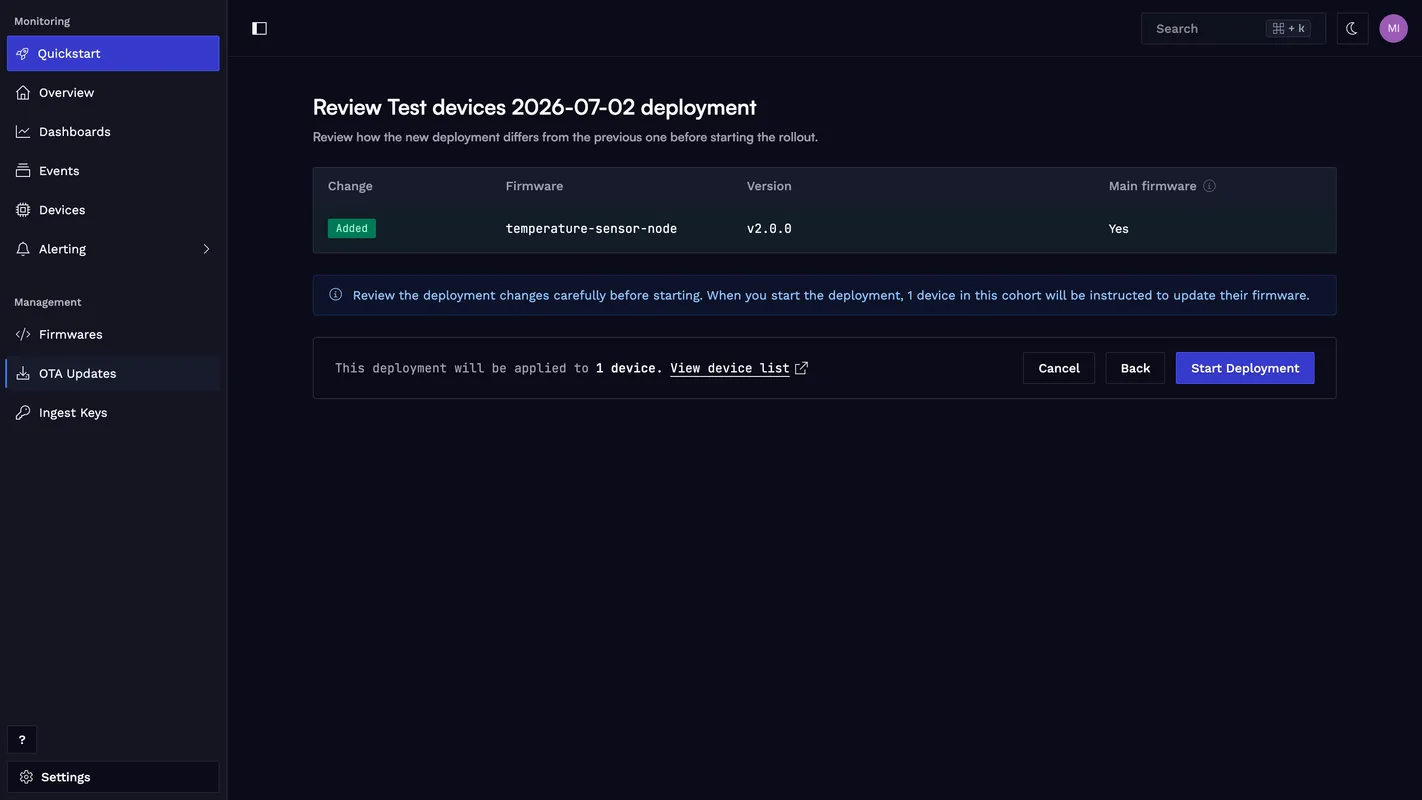
The moment you start the deployment, the Spotflow cloud notifies every device in the cohort about the update over MQTT.
Watching the update in action
Once the deployment starts, the device receives the update notification and the SDK begins the update sequence. The progress callback fires at each phase transition:
[00:14:58] <inf> spotflow_ota: handle_decoded_c2d_message: OTA attempt 1 accepted (1 artifacts)
[00:14:58] <inf> spotflow_ota: initialize_worker_operation: OTA attempt 1: started artifact 'temperature-sensor-node' v2.0.0 (index 0, main)
[00:14:58] <inf> spotflow_ota: spotflow_ota_fw_main_process_artifact: OTA attempt 1: started main firmware artifact 'temperature-sensor-node' v2.0.0
[00:14:58] <inf> spotflow_ota: spotflow_ota_fw_main_process_artifact: Main firmware phase -> pending download
[00:14:58] <inf> main: spotflow_on_main_firmware_update_progressed: OTA progress: phase=PENDING_DOWNLOAD paused=0 result=0
[00:14:58] <inf> spotflow_ota: download_started_cb: Main firmware phase -> downloading
[00:14:58] <inf> main: spotflow_on_main_firmware_update_progressed: OTA progress: phase=DOWNLOADING paused=0 result=0
[00:14:59] <inf> main: main: Temperature: 31.4 C
[00:15:01] <inf> main: main: Temperature: 33.7 C
... (download continues for ~40 s) ...
[00:15:37] <inf> main: main: Temperature: 31.9 C
The download runs concurrently with the sensor loop. After the image is written to the secondary flash slot, the SDK requests the test upgrade and reboots the device. The last PENDING_UPGRADE and PENDING_REBOOT phase transitions are logged immediately before sys_reboot() is called and may not appear on the serial output if the UART buffer doesn’t flush in time.
MCUboot detects the pending test upgrade and performs the image swap:
*** Booting MCUboot ee39e2d694bd ***
*** Using Zephyr OS build v4.4.0 ***
I: Starting bootloader
I: Image index: 0, Swap type: test
I: Starting swap using offset algorithm.
I: Bootloader chainload address offset: 0x20000
*** Booting Zephyr OS build v4.4.0 ***
Swap type: test means the new image is running in MCUboot’s test mode. It will revert automatically if the device reboots before the image is confirmed.
The application starts and confirm_unconfirmed_main_firmware() detects the UNCONFIRMED phase. The OTA worker thread concurrently fires the progress callback:
[00:16:11] <inf> main: main: Temperature sensor node v2.0.0 starting
[00:16:11] <inf> main: spotflow_on_main_firmware_update_progressed: OTA progress: phase=UNCONFIRMED paused=0 result=0
[00:16:11] <inf> main: confirm_unconfirmed_main_firmware: New firmware booted (phase=UNCONFIRMED) — confirming image
[00:16:11] <inf> spotflow_ota: complete_main_firmware_success: Main firmware update succeeded for OTA attempt 1 ('temperature-sensor-node' v2.0.0)
[00:16:11] <inf> main: spotflow_on_main_firmware_update_progressed: OTA progress: phase=NOT_RUNNING paused=0 result=1
[00:16:11] <inf> main: confirm_unconfirmed_main_firmware: Firmware v2.0.0 confirmed — result will be reported to Spotflow
[00:16:11] <inf> spotflow_ota: initialize_worker_operation: OTA attempt 1: completing reconciled main firmware artifact 'temperature-sensor-node' v2.0.0 (index 0)
[00:16:11] <inf> spotflow_ota: process_artifact_operation: OTA attempt 1: artifact 'temperature-sensor-node' v2.0.0 succeeded
[00:16:13] <inf> main: main: Sensor loop running — ready to receive OTA updates
[00:16:13] <inf> main: main: Temperature: 29.2 C
[00:16:15] <inf> main: main: Temperature: 28.1 C
After confirmation, the device reconnects to MQTT and reports success. On the next reboot, MCUboot shows Swap type: none, meaning the image is permanently confirmed:
*** Booting MCUboot ee39e2d694bd ***
*** Using Zephyr OS build v4.4.0 ***
I: Starting bootloader
I: Primary image: magic=good, swap_type=0x2, copy_done=0x1, image_ok=0x1
I: Secondary image: magic=unset, swap_type=0x1, copy_done=0x3, image_ok=0x3
I: Jumping to the first image slot
*** Booting Zephyr OS build v4.4.0 ***
[00:00:04] <inf> main: main: Temperature sensor node v2.0.0 starting
[00:00:04] <inf> main: confirm_unconfirmed_main_firmware: OTA phase: NOT_RUNNING
[00:00:06] <inf> main: main: Temperature: 29.2 C
[00:00:08] <inf> main: main: Temperature: 28.1 C
The readings shifted up from the v1.0.0 range of 28–34 °C to the v2.0.0 range of 29.5–35.5 °C. The +1.5 °C calibration fix is now live across the fleet.
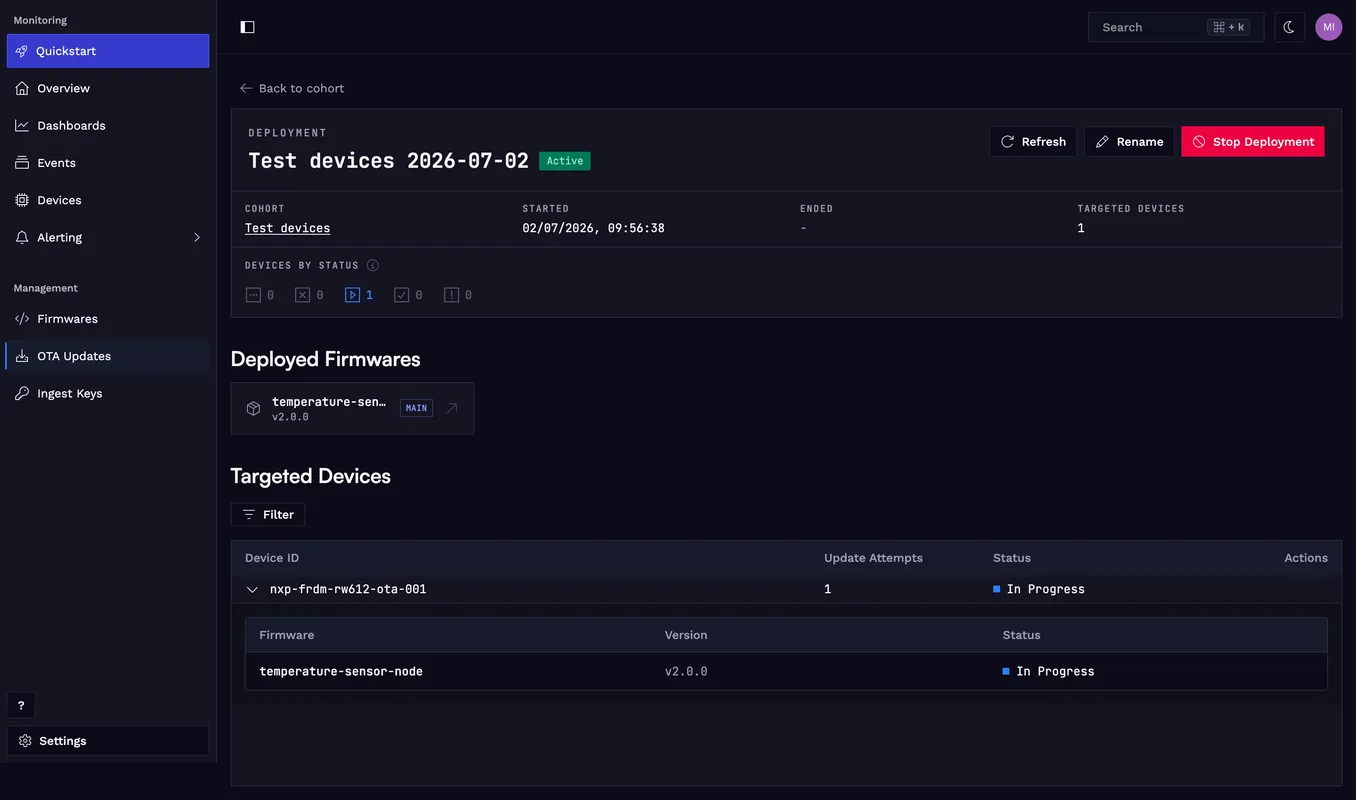
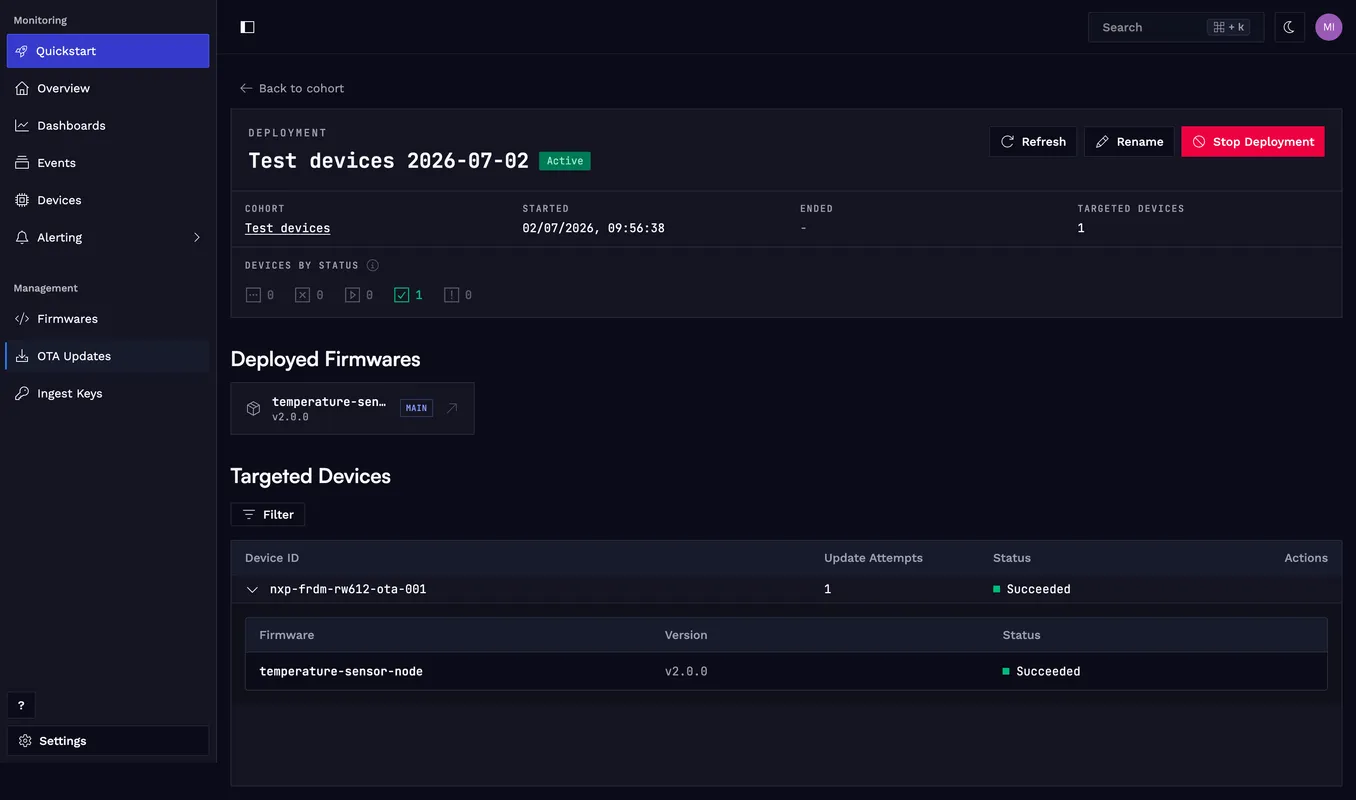
After the device reconnects to MQTT and reports success, the portal shows the device as Succeeded:
Rollback safety
MCUboot’s test upgrade mode is the safety net. When the SDK calls boot_request_upgrade(BOOT_UPGRADE_TEST) before rebooting, MCUboot marks the new image as unconfirmed in its internal state. Two things then happen:
- If the new image boots and your code calls
spotflow_confirm_main_firmware_image(), MCUboot records the image as confirmed, and it keeps running as the main image on every subsequent boot. - If the device reboots again before confirmation (because of a crash, a watchdog reset, or an explicit
sys_reboot()in a failed self-test), MCUboot treats the image as invalid and swaps back to the previous firmware.
This means you can insert real validation logic before the confirm call:
/* Run self-tests before confirming. */
if (!sensor_bus_accessible()) {
    LOG_ERR("Sensor bus check failed — rolling back");
    sys_reboot(SYS_REBOOT_COLD);  /* MCUboot reverts on next boot */
}

spotflow_confirm_main_firmware_image(&state);
If the rollback fires, the SDK detects the build ID mismatch after the device reconnects and reports the update as Failed in the portal. You can inspect the failure and retry the deployment once the issue is fixed.
Advanced: pausing and resuming
In some deployments you cannot reboot immediately. For example, the device might be in the middle of writing a critical log entry, or a user-facing operation is in progress. The SDK supports pausing the update at any phase:
void spotflow_on_main_firmware_update_progressed(
    const struct spotflow_ota_main_firmware_state *state)
{
    if (state->phase == SPOTFLOW_OTA_PHASE_PENDING_REBOOT) {
        LOG_INF("Firmware update ready. Rebooting in 30 seconds.");
        k_sleep(K_SECONDS(30));
        /* SDK reboots after this callback returns. */
    }
}
For situations where the delay is not a fixed time but depends on external events, use spotflow_pause_main_firmware_update() and spotflow_resume_main_firmware_update():
void spotflow_on_main_firmware_update_progressed(
    const struct spotflow_ota_main_firmware_state *state)
{
    if (state->phase == SPOTFLOW_OTA_PHASE_PENDING_REBOOT) {
        LOG_INF("Update ready — waiting for safe window before reboot.");
        spotflow_pause_main_firmware_update(NULL);
    }
}

/* Called from your application when the safe window opens. */
void application_safe_window_opened(void)
{
    struct spotflow_ota_main_firmware_state state;
    if (spotflow_get_main_firmware_update_state(&state) == 0 && state.is_paused) {
        spotflow_resume_main_firmware_update(&state);
    }
}
The download can also be paused mid-transfer (DOWNLOADING phase). After resuming, the SDK restarts from where it stopped using HTTP Range requests.
Applying to your project
The integration shown here is not specific to the FRDM-RW612. Any Zephyr board that supports MCUboot can use the same prj.conf additions, the same sysbuild.conf, and the same main.c pattern. Boards that do not already define MCUboot image slots in their default DTS will need a board overlay to add them; see the MCUboot Zephyr guide for how to define the slots.
The complete reference implementation is in the zephyr-firmware-ota directory. The README covers the full setup: west workspace, NXP binary blobs, build, flash, and the v1 → v2 deployment walkthrough.
Conclusion
Enabling OTA updates on a Zephyr application with Spotflow takes a few additions to an existing project: CONFIG_SPOTFLOW_OTA=y, CONFIG_SPOTFLOW_OTA_AUTO_HANDLE_MAIN_FIRMWARE=y, the flash and settings backends, and SB_CONFIG_BOOTLOADER_MCUBOOT=y in sysbuild.conf. The application only needs to call spotflow_confirm_main_firmware_image() on boot and optionally implement a progress callback.
The SDK handles everything else: downloading the signed image over HTTPS, swapping it into the MCUboot secondary slot, triggering the test upgrade, detecting the unconfirmed state after the reboot, and reporting the result to the cloud. MCUboot’s test mode provides a hard safety net: if the new image does not confirm, the device reverts to the previous firmware automatically.
Ready to get started? Sign up for Spotflow, no credit card required.
Explore the documentation to go deeper:
- Guide: Over-the-air (OTA) updates with Zephyr
- Guide: Deploy Over-the-Air (OTA) Updates
- Fundamentals: Over-the-air (OTA) updates
- Fundamentals: Firmware management
- zephyr-firmware-ota on GitHub
Questions or feedback? Reach out on Discord or email hello@spotflow.io.